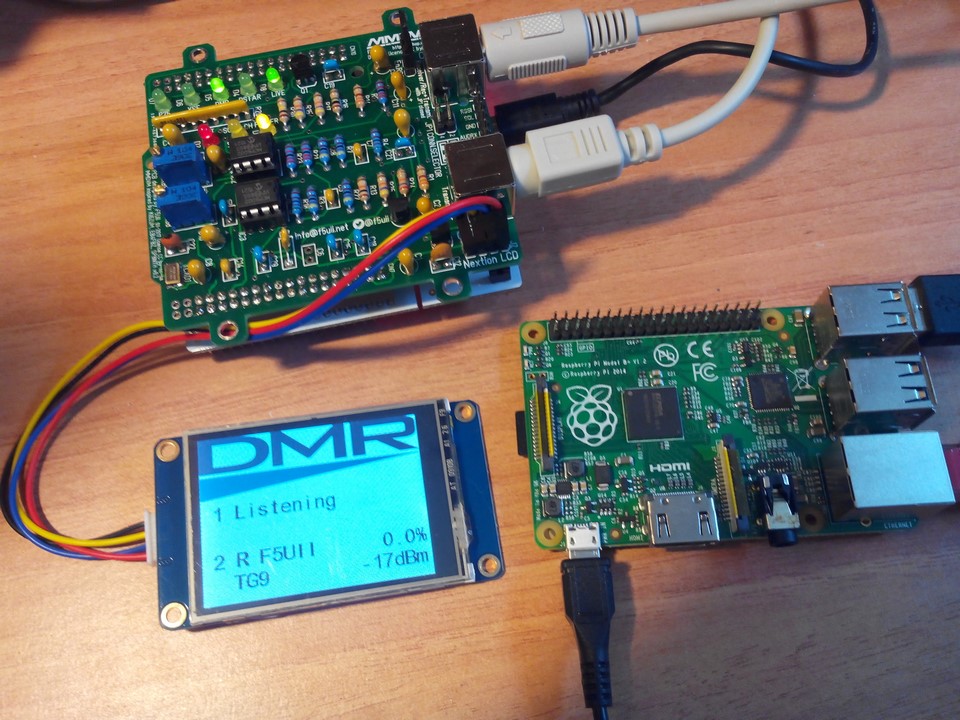
In lieu of keeping your local repeater tied up, you can purchase a DMR hotspot that you can use practically anywhere there is an internet connection. While your local repeater can always be used for local QSOs, if you're looking to take
In an analog repeater setup, one user ties up the repeater at one time. In digital repeater setups, TDMA allows for two time slots, which opens up users to two simultaneous QSOs. Every now and then, a ragchew occurs that ties up the repeater. While you can always break in on analog to reach out, it’s tougher on digital due to needing the correct talkgroup to break in on as well. Besides, most linked DMR repeaters keep one time slot dedicated to a particular talkgroup. What if you wanted to keep the ragchew going and were out of range to do a simplex QSO? Especially in digital voice, more often than not you are talking to someone way out range, perhaps on a different continent.
This is where having your own personal hotspot makes logical sense. A DMR hotspot is essentially a low power simplex repeater (milliwatts). This allows you to have access to all of the Brandmeister network. In addition linking to Dstar, and Yeasu System Fusion is possible.
SharkRF recently released a new version of their highly popular openSpot hotspot, this one being version two: https://www.sharkrf.com/products/openspot2/
Instead of an ethernet cable, it is now completely wireless. You still need to provide a 5v power source, but that is easy to come by. The web interface with the hotspot is completely polished. This is a great set it and forget it device, and is completely independent of any computer. If you're not adventurous at the least, this would be the best option.
Cost is around $200, depending on the exchange rate to Euro. What you're paying for is customer service and a severely simple to use interface.
In 2017, DF2ET and DB9MAT came up with the MMDVM_HS_HAT board. This board sits on top of a Raspberry Pi (The technical term being a “hat”), and uses the General Purpose IO pins to communicate. The neat feature about the HS_HAT (and subsequently any variant) is that you can add a tiny OLED screen or A NEXTION screen to enable a small graphic interface to the exterior. All variants of the hat use a software suite called Pi-Star to leverage the MMDVM suite of software to enable multi-mode digital voice operation.
Around the same time, the aforementioned ZumSPOT was created. There was a little kerfuffle over the design of the HS_HAT board in terms of cloning the ZumSPOT. More about some of the story backline can be seen in these posts:
The Raspberry Pi hat design has been cloned in the Chinese market, with one popular design being the JumboSPOT. If you read the links above, you'll find out that the version 1.2 board of the JumboSPOT was a rather direct clone. Not giving credit per the Open Source Creative Commons license. It's tough for anyone to prove if any bootlegger is creating the knock off strictly for-profit, but we know they are.
http://radioaficion.com/news/jumbo-spot-rtq-mini-mmdvm/
• https://robrobinette.com/Ham_VHF-UHF_Digital_Modes.htm (Wealth of knowledge)
There are two options: 1st - Email D2FET and DB9MAT to purchase. Roughly $70 + shipping American - [email protected] 2nd - Print your own PCBs, order the parts from Mouser, and solder it yourself (SUPER tiny components).
Buy on AliExpress or eBay
With a Chinese knock off unit, you're essentially getting the same parts, as the firmware is updatable. That part isn't the issue. The only noticeable difference would be the board revision. You need to look EXTRA CAREFULLY at each listing to make sure you're finding a board with the latest revision (should be 1.6 for the solo, and 1.2 for the dual). The other way to tell if it is a knock-off is the reset button used.
One extra note in the links mentioned. There is a duplex version and a standard single antenna version. The duplex allows for true repeater functionality with two simultaneous Timeslots, whereas the solo antenna board is strictly single Timeslot.
Brandmeister Account DMR-MARC ID Raspberry Pi Zero (if needed) Internet access
http://www.pistar.uk/downloads/ - download the RPi version
Remember, all you need to do, is download the zipped version of the image that is most suitable for your Pi / Single Board Computer, Unzip the Download. Before flashing the image, consider using this link: http://www.pistar.uk/wifi_builder.php to build a wpa_supplicant file to program your wireless creds into the image.
Flash the image to your SD card (using your prefered image writing tool - see links below for some basic instructions), boot the Pi, wait 30-40 secs and then login to the admin portal in order to finish the setup your Pi-Star.
here: http://pi-star.local/admin/
Default Username: pi-star Default Password: raspberry
For help getting started, see this *EXCELLENT* video by Craig (W1MSG): https://www.youtube.com/watch?v=B5G4gYDdJeQ
Setup guide: http://radioaficion.com/news/jumbo-spot-rtq-mini-mmdvm/
Video Guides: https://youtu.be/UBDqPFzDH5g And https://youtu.be/DDZMY_6qjjI
https://forum.pistar.uk/viewtopic.php?f=5&t=281&p=883&hilit=node+type#p883
Make node public vs private. Otherwise, just your radio will connect to the hotspot.
Log in to pi-star via SSH sudo pistar-mmdvmhshatflash Then, Sudo pistar-mmdvmhshatflash hs_hat For the Solo Hat,
Command line full parameters This tool is used to flash your MMDVM_HS Hat Modem to use the command, you will need to pass the name of your modem, please choose form the list below…
To flash HS_HAT (14.7456MHz TCXO) connected to GPIO, run: pistar-mmdvmhshatflash hs_hat To flash HS_HAT (12.288MHz TCXO) connected to GPIO, run: pistar-mmdvmhshatflash hs_hat-12mhz To flash HS_DUAL_HAT connected to GPIO, run: pistar-mmdvmhshatflash hs_dual_hat
To flash ZumSPOT devices by please use pistar-zumspotflash To flash MMDVM_HS Nano Hat devices please use pistar-nanohsflash To flash your BD7KLE/BG3MDO devices please use pistar-mdoflash
Source: Jumbo-Spot Zumspot Firmware Update GitHub source - https://github.com/juribeparada/MMDVM_HS https://youtu.be/gwKgOiBcSxQ http://hvdnotebook.blogspot.com/2018/08/mmdvm-firmware-why-update-how-to-update.html?fbclid=IwAR1slYr_bNCA6HZETX-pnBf7sh6Keu3Q5kAol-l2cyLayfZxoFJPQB-fxg0
Expert Settings: https://www.youtube.com/watch?v=zzvRVaoIuXg&feature=share
Getting commands to work: https://forum.pistar.uk/viewtopic.php?f=3&t=189&p=521&hilit=shutdown#p521
I've noticed that my callsign has shown up on APRS.fi, with the comment of MMDVM MMDVM HS Hat 440.0250/440.0250 CC1 which is the frequency I run on, and the colour code. Strange.. don't recall my hotspot having APRS capabilities..
In short, log in to your Brandmeister Dashboard, and find on the bottom right “My Hotspots”. Click your hotspot ID number, and you'll be presented with a General settings page. The first setting is Priority Message. Put NOAPRS in the field. At the bottom, click save changes.